
Frequently Asked Questions
All you wanted to know about HIPAA
Topics
Got a question?Contact us.
General
Which course should I take?
First you need to decide which category you fall into. We have 5 categories:
- Healthcare Provider - Any individual or organization involved in direct medical treatment of patients
- Mental Health - Any individual or organization involved in direct medical treatment of patients involving mental health
- Business Associate - Any individual or organization that provides products and/or services to healthcare providers, health insurance providers, employer group health plans, or healthcare clearinghouses
- Insurance Brokers and Agents - Any individual or organization that provides health insurance brokerage or administration services.
- Employer and Employer Group Health Plans - HR staff of any organization involved in sponsoring and managing group health plan benefits for its employees
Once you decide which category you belong to, then you need to decide which course to take, which is the subject of the next FAQ answer below. If you need a little help in deciding on your category, see further down in this section.
Do I need to take the HIPAA Awareness training course, HIPAA Security training course, or both?
Everyone needs to take the HIPAA Awareness training course which is required by the HIPAA Privacy regulations. This training goes over each person's responsibilies and required safeguards before being given access to protected health information. In addition, the HIPAA Awareness training gives a good overview of the main 3 components of HIPAA which are transactions, privacy, and security as well as the most recent changes to HIPAA with the ARRA HITECH Act in 2009 and Omnibus Rule in 2013.
The HIPAA Security training course is about safeguards and protections for protected health information specifically in electronic form, such as locking down computers, networks, encrypting data, doing backups, etc. The HIPAA Security course only needs to be taken by the people who will be involved in implementing HIPAA Security which is typically the HIPAA compliance officer, IT staff, business owners, etc. We provide enough of an overview of HIPAA Security in the Awareness training for the average person and the HIPAA Security course is more of a detailed course on just HIPAA Security for those who will need to implement it.
Are you located in Texas or have locations in Texas?
If you are located in Texas or have locations in Texas you will also need to comply with Texas House Bill 300 (or Texas HB 300 for short).
To get the training with Texas HB 300, go to the category of your training as explained above, and then on the right hand side there will be a Texas Icon, click on that, and it will take you to the Texas HB 300 version of the training.
For more information on Texas HB 300 click on the FAQs Topics category "Texas HB 300" to your left.
I am a medical student. Do I need to take the Awareness course, Security course, or both?
You only need to take the Awareness Training for Healthcare Providers course. The Security course is about safeguarding protected health information on computers, networks, etc and more for someone who needs a more detailed understanding or who is implementing HIPAA Security such as a compliance officer, business owner, or IT staff.
What do I need to take the training?
All you need is a computer with an internet connection and web browser.
Which category of training do I need?
| You or Your Organization | HIPAATraining.com Product Category |
|---|---|
| Medical Student | Healthcare Provider |
| Physician | Healthcare Provider |
| Nurse | Healthcare Provider |
| Dentist | Healthcare Provider |
| Chiropractor | Healthcare Provider |
| Medical Clinic | Healthcare Provider |
| Hospital | Healthcare Provider |
| Durable Medical Equipment Provider | Healthcare Provider |
| Pharmacy | Healthcare Provider |
| Laboratory | Healthcare Provider |
| Opthamologist | Healthcare Provider |
| Optometrist | Healthcare Provider |
| You or Your Organization | HIPAATraining.com Product Category |
|---|---|
| Medical Student in Mental Health | Mental Health |
| Psychiatrist | Mental Health |
| Psychologist | Mental Health |
| Mental Health Social Services | Mental Health |
| Behavioral Services | Mental Health |
| Psychiatry Clinic | Mental Health |
| Mental Health Institutions | Mental Health |
| You or Your Organization | HIPAATraining.com Product Category |
|---|---|
| HR and IT Staff for an Employer Who Sponsors one or more Group Health Plans for its Employees | Employer Group Health Plans |
| You or Your Organization | HIPAATraining.com Product Category |
|---|---|
| Insurance Brokers/Agents | Insurance Brokers and Agents |
| Third Party Administrators (TPAs) | Insurance Brokers and Agents |
| You or Your Organization | HIPAATraining.com Product Category |
|---|---|
| Medical Billing | Business Associate |
| Record/Document Storage | Business Associate |
| Medical Transcription | Business Associate |
| Software Companies | Business Associate |
| Collection Agencies | Business Associate |
| Answering Services | Business Associate |
| IT Consultants | Business Associate |
| Consultants | Business Associate |
| Actuaries | Business Associate |
| Marketing Agencies | Business Associate |
| Printing Services | Business Associate |
| Medical Device Manufacturers | Business Associate |
| Cleaning Services | Business Associate |
| Medical Couriers | Business Associate |
| Asset, Technology, and X-ray Recyclers | Business Associate |
| Legal Services | Business Associate |
| Accounting Services | Business Associate |
Pricing
What is the cost of individual training?
The pricing for a single course (either awareness or security) is $29.99. There is a special bundled price of $49.99 if you take both the awareness and security courses. To get the bundled pricing, just add both courses to your shopping cart.
Do you offer training that an organization can use to train its employees and group discounts?
We offer an organizational training option for training multiple individuals (see Organizational Training FAQ section) and also group discounts starting at 10 seats and above.
To signup for an organizational account, simply add the desired number of seats to your shopping cart and then checkout. The account will then be enabled for that number of licenses. If you need to add licenses in the future, you can do so using the Add More Licenses link when you login to your admin dashboard.
Do you offer volume discounts?
Yes we do. Your pricing is based on the initial number of seats you purchase (see table below) and then as you continue to purchase seats with us we continue to discount you down in pricing as you hit the new tiers.
| Number of Training Seats | Pricing per Seat |
|---|---|
| 1 - 9 | $29.99 |
| 10 - 24 | $24.99 |
| 25 - 49 | $23.99 |
| 50 - 99 | $22.99 |
| 100 - 199 | $19.99 |
| 200+ | See Custom Quote |
Awareness Price Per Seat: $0.00
Security Price Per Seat: $0.00
Awareness Subtotal: $0.00
Security Subtotal: $0.00
You Saved: $0.00
Total Price: $0.00
If I purchase seats after my initial purchase do I still get a volume discount?
Yes you continue to receive the same discount level on additional seats. So if you bought 25 seats, your pricing would be $23.99 for those 25 seats and also for any future seats you purchased. Additionally, as you continue to purchase seats with us we continue to discount you down in pricing as you hit the new tiers.
Individual Training
What is the cost of individual training?
The pricing for a single course (either awareness or security) is $29.99. There is a special bundled price of $49.99 if you take both the awareness and security courses. To get the bundled pricing, just add both courses to your shopping cart.
Who is the individual training for?
It is for any individual looking to get their HIPAA certification or learn more about HIPAA.
Can I take the training immediately after signing up?
Yes. You create a username and password as part of the sign up process, so you can use that username/password immediately after payment to login and start your training.
How long do I have to take the training?
You have up to 90 days from the date of signup to take the training so you can take your time. You can also login and review the training during those 90 days as well.
What if I don't pass the final exam? Do I have to pay for the training again?
You can take the final exam as many times as you need to pass and you can also take it multiple times if you want to try for a higher score. There is no charge for taking the final exam multiple times.
How long does the training take?
The average time for a person to complete the Awareness training is 1.5 hours from start to taking the final exam and getting their certificate. The Security training is also 1.5 hours long.
Do I have to take the training in one sitting?
No you can take the training at your own pace and in multiple sessions. If you get interruped, just logoff and then when you log back in, just click on the lesson you stopped at. You do want to set aside 15 minutes when it is time to take the final exam, however, so that you can have maximum concentration.
How long is your certificate of completion good for?
HIPAA only specifies that employees be retrained when the regulations change. However, the majority of employers do retraining on a yearly or 2 year basis. Our certificates are by default dated for 2 years so you would need to take a refresher training again after 2 years.
What if I want to put a different name on the certificate from the information I enter on the registration screen for my billing information?
The name on the certificate is independent of the name you use to register for the course. Our system will actually prompt you for the name on your certificate once you pass the final exam so that you can enter it exactly as you want it.
How and when will I receive my certificate of completion?
After successfully completing the final exam, you will be asked to enter your name on the certificate and it will generate an adobe acrobat PDF certificate for you along with transcript scores immediately online.
What format is the certificate and how can I view and print it?
Your certificate of completion is an adobe acrobat PDF file. All you need to view and print the certificate is the free adobe acrobat reader. If you don't have the adobe reader software installed on your computer, you can download it free from adobe's website at:
Click Here to Download Adobe ReaderIs your training certified by the government?
The Department of Health and Human Services is responsible for regulating HIPAA, but they currently do not provide a training vendor certification process. So to ensure we are providing proper training we have consulted HIPAA experts as well as had our training reviewed by a law firm specializing in HIPAA.
What is the retraining requirement under HIPAA?
The regulations only specify periodic retraining and when the regulations change. They don't specify the periodicity.
Our recommendation and our default is retraining every 2 years. Some organizations do yearly but we feel that is too often for what is needed. The reasoning behind the 2 years is based on the reason you are giving the training. As an employer you are protecting yourself against liability if the employee does something improper by showing you not only gave training but also had policies and procedures in place. So if someone did something outside of that, then it is not the employer's fault.
2 years is about that window you can still argue of it being adequate training. When you go beyond the 2 year mark, you leave the door open for an employee to push back the liability on the organization by saying how they are supposed to remember after that long. So that is the reason for the 2 years to satisfy the periodic retraining and keep the employer from being liable in situations where someone does something improper outside of the regulations.
Employees would retrain every 2 years using a new seat/license for them. In exchange we keep the training material up to date with the latest regulations at no charge, we take care of training employees in between their 2 year cycle at no charge in situations where the regulations change in between their 2 year cycle, and we continue to drop your pricing on a cumulative basis.
The way you can tell who needs to be trained is to look at the training log at the beginning of each month and look 2 years back. That will give you the list of people that need to be retrained in a particular month.
What if I am a single individual but need to train more people in the future?
You can start off with a single training seat and then add more seats in the future by logging in and clicking on the Add More Licenses button to add more seats.
Can I train multiple people using an individual account?
No. Only if you have purchased organizational training. Our individual training is licensed to a single individual only.
Can I have multiple people view the training?
Sorry the license for the single user training is for a single individual only. To train multiple users, you will need to purchase additional training seats.
I purchased a single training seat and then had someone else take the training in addition to myself. Why does it show my name on the certificate when the other person took the training?
Sorry the license for the single user training is for a single individual only. Our individual certificates are locked to the first individual's name after you enter it in the first time. To train multiple users, you will need to purchase additional training seats.
Organizational Training
Do you offer training that an organization can use to train its employees?
Yes we do.
Who is the organizational training for?
Organizational training is for employers/groups that need to train their employees. It provides a single shared login that all employees can login to as well as group discounts starting at 10 seats and above.
What is the minimum number of seats I need to create a organizational training account?
Two seats. If you need to add licenses in the future, you can do so using the Add More Licenses link when you login to your admin dashboard.
If I have fewer than 10 seats initially will I get the discount when I reach 10 seats in the future?
Yes our system automatically keeps track of the number of cumulative licenses and will automatically apply the new discount pricing starting on the 10th seat.
How does organizational training work?
Our organizational training option uses a shared multi-user account setup. It involves zero administration as it does not require you to setup user names and passwords. Once your account is setup, everyone logs in using the same username/password. They take the training and once they are done, each individual takes the final exam. On successfully passing the final exam, each individual enters their name on their certificate and gets a generated pdf certificate immediately for them to save or print off. A copy of that certificate with transcript scores are automatically emailed to the administrator's email address on the account for compliance record keeping.
So all you have to do is give everyone the username/password, give them a deadline in which to take the training, and sit back and get an email copy as everyone finishes the training. It couldn't be easier.
If everyone logs in using the same username/password how does it track and generate a certificate for each individual?
Each person logging into the multiuser training account receives their own unique session even though they are using the same login. On successfully completing the final exam, each persion is uniquely identified by prompting them for their name on their certificate. After entering their name, it generates a certificate for the individual and emails a copy to the administrative email address for your records. Doing it this way, there is zero administration required with our system.
Can more than one person login to take the training at the same time?
Absolutely. Each person logging in is treated independently even though they are logging in with the same username and password. All your employees could login at the same time or different times. Our system can handle thousands of simultaneous users.
Do you offer reporting with the organizational training account so I can tell who has taken the training?
Yes we provide reporting free with the organizational training account. There are two types of reporting that we provide. The first is that you will receive an automatic email copy of each certificate generated under the account. The second is web based real time training log that pulls certificate data from our database over the internet and creates and maintains a training log for you automatically. It will also allow you to export to Excel as well as regenerate a certificate at anytime in case you lost or misplaced a certificate.
Do you offer volume discounts?
Yes we do. Your pricing is based on the initial number of seats you purchase (see table below) and then as you continue to purchase seats with us we continue to discount you down in pricing as you hit the new tiers.
| Number of Training Seats | Pricing per Seat |
|---|---|
| 1 - 9 | $29.99 |
| 10 - 24 | $24.99 |
| 25 - 49 | $23.99 |
| 50 - 99 | $22.99 |
| 100 - 199 | $19.99 |
| 200+ | See Custom Quote |
Awareness Price Per Seat: $0.00
Security Price Per Seat: $0.00
Awareness Subtotal: $0.00
Security Subtotal: $0.00
You Saved: $0.00
Total Price: $0.00
If I purchase seats after my initial purchase do I still get a volume discount?
Yes you continue to receive the same discount level on additional seats. So if you bought 25 seats, your pricing would be $23.99 for those 25 seats and also for any future seats you purchased. Additionally, as you continue to purchase seats with us we continue to discount you down in pricing as you hit the new tiers.
How do I sign up for the organizational training option?
You can simply add two or more seats to your shopping cart. That will automatically create an organizational training account. If you initially purchased a single seat, you can also upgrade that to an organizational training account by purchasing additional seats to get you to a total of two seats or more.
How long does it take to setup?
Your organizational training account is available immediately upon completing the checkout.
How long before the seats I purchased expire?
With our organizational training, there is no expiration date on seats. The seats are good until you use them.
Is there any charge for keeping the training account active?
No we only charge on a pay per use basis. If you do not use it, you do not pay anything.
How do you handle billing beyond the initial seats purchased?
The default mode is prepay where you add seats as needed via a creditcard. So to add more seats, you simply login to your admin dashboard and click on the Add More Licenses link to add seats when you need them. Alternatively we can also setup NET 30 terms and invoicing if you would prefer.
How long does the training take?
The average time for a person to complete the Awareness training is 1.5 hours from start to taking the final exam and getting their certificate. The Security training is also 1.5 hours long.
What if someone doesn't pass the final exam? Do I have to pay for their training again?
No each person can take the final exam as many times as they need to pass and they can also take it multiple times if they want to try for a higher score. There is no charge for taking the final exam multiple times.
Does each person have to take the training in one sitting?
No they can take the training at their own pace and in multiple sessions. If they get interrupted, they just logoff and then when they log back in, they just click on the lesson they stopped at. They do want to set aside 15 minutes when it is time to take the final exam however so that they can have maximum concentration.
How long are the certificate of completions good for?
HIPAA only specifies that employees be retrained when the regulations change. However, the majority of employers do retraining on a yearly or 2 year basis. Our certificates are by default dated for 2 years so you would need to take a refresher training again after 2 years. For those employers who prefer to retrain on a yearly basis, we have the ability to set your organizational training account to be dated for 1 year instead of 2 if you prefer.
What format is the certificate of completion in?
The certificate of completion is an adobe acrobat PDF file. All you need to view and print the certificate is the free adobe acrobat reader. If you don't have the adobe reader software installed on your computer, you can download it free from adobe's website at:
Click Here to Download Adobe ReaderIs your training certified by the government?
The Department of Health and Human Services is responsible for regulating HIPAA, but they currently do not provide a training vendor certification process. So to ensure we are providing proper training we have consulted HIPAA experts as well as had our training reviewed by a law firm specializing in HIPAA.
Can I train multiple people using an individual account?
No. Only if you have purchased organizational training. Our individual training is licensed to a single individual only.
Can I have multiple people view the training?
Sorry the license for the single user training is for a single individual only. To train multiple users, you will need to purchase additional training seats.
Certificates
How and when will I receive my certificate of completion?
After successfully completing the final exam, you will be asked to enter your name on the certificate and it will generate an adobe acrobat PDF certificate and wallet card for you along with transcript scores immediately online.
What format is the certificate and how can I view and print it?
Your certificate of completion is an adobe acrobat PDF file. All you need to view and print the certificate is the free adobe acrobat reader. If you don't have the adobe reader software installed on your computer, you can download it free from adobe's website at:
Click Here to Download Adobe ReaderHow long is the certificate good for?
2 years. However it will ultimately depend on your organization's retraining policy. If your organization's policy is to recertify yearly, then you will need to take the training yearly. Usually those who do the yearly either have a contractual obligation that requires yearly or they've internally decided they want to do yearly.
If I take the HIPAA Awareness training course and the HIPAA Security training course will I get a separate certificate for both?
Yes you will receive two separate certificates.
What does your certificate look like?
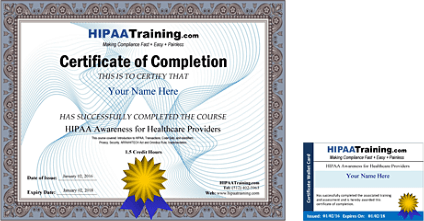
Can I put my company name on the certificate?
Yes you can enter your desired company name on the registration page and it will put your company on every certificate generated. It is an optional setting so if you don’t want a company name on the certificate then just leave that blank.
Documentation Kits
What are your HIPAA Compliance Documentation Kits?
There are three parts to HIPAA compliance: employee/staff training, compliance officer, and the documents, forms, contracts, and policies and procedures for the organization. Our organizational training is for the employee/staff training portion of compliance where as the documentation kits are for the organizational documents and training of a compliance officer portions of compliance.
What HIPAA Compliance Documentation Kits do you offer?
We have one documentation kit for HIPAA Privacy and another for HIPAA Security. HIPAA Privacy and HIPAA Security are two separate HIPAA regulations with their own standards and requirements and hence the reason we have two separate kits.
Who are the HIPAA Documentation Kits meant for?
They are meant for the person designated as the HIPAA Privacy/Security/Compliance officer for your organization to help them implement HIPAA compliance at your organization.
How do the HIPAA Documentation Kits fit into my organization's HIPAA compliance?
In short, HIPAA Organizational Compliance requires 3 things: Compliance officer, employee training, and formal documents and controls.
In terms of our product to satisfy that, it would be a combination of our HIPAA Organizational Training and our HIPAA Organizational Documentation Kits.
What is included in your HIPAA Compliance Documentation Kits?
They contain a step by step to do list walking you through the entire HIPAA compliance process along with all the forms, policies and procedures, documents, etc needed to implement HIPAA compliance at your organization. All the documents are available in ready to use Microsoft Word format and are available for immediate download.
Is training included as part of your HIPAA Compliance Documentation Kits?
The online training and the documentation kits are two separate offerings and sold separately. This allows organizations to mix and match depending on their unique needs and what they already have in place.
What types of forms/templates do you provide as part of the Documentation Kits?
Notice of privacy practices, authorization forms, business associate contracts, documents to support individual patient rights, policies and procedures, breach notification, etc, all in Microsoft Word format. They can be downloaded individually or in one zip file.
Do I need the HIPAA Privacy Documentation Kit, HIPAA Security Documentation Kit, or both?
Everyone needs to comply with HIPAA Privacy. So you would need the HIPAA Privacy Documentation Kit for sure.
You only need HIPAA Security if your organization stores, maintains, or transmits protected health information electronically. Since most organizations store protected health information on computers these days, most organizations will have to comply with HIPAA Security. If that applies to your organization, then you will need the HIPAA Security Documentation Kit. The only organizations that won't need the HIPAA Security Documentation Kit are those that do everything on paper.
How much do the Documentation Kits cost?
There are two HIPAA Compliance Documentation Kits: a HIPAA Privacy Documentation Kit and HIPAA Security Documentation Kit. They are $499.99 each and are licensed per organization.
Why are the Documentation Kits so expensive?
Many of our customers would ask why it is so cheap. We have taken the HIPAA regulations and made them extremely easy to implement without having to hire expensive legal counsel or consultants. Everything is in ready to use format with step by step instructions and we have a hour long jumpstart video that walks you through the entire process. In addition we include our time/consulting hours at no charge to make sure we get you through the process. Our pricing is a fraction of what it would cost to develop the documents yourself, with a lawyer or by hiring a consultant.
Do I need any special qualifications to use the Documentation Kits?
No there is no prior compliance or HIPAA experience required to use the kits. We start you from scratch. We've made them extremely easy to use so anyone can do it.
However, there is one caveat. Since HIPAA Security requires that you lock down your computers, networks, etc, you may have to work with your IT staff or an IT consultant to actually implement some of the safeguards in the Documentation Kit. The Security Documentation Kit will provide you with all the documented policies and procedures such as a policy and procedure requiring daily backups but then you will need someone to actually implement those backups as an example.
What if I get stuck or have questions?
We've made the process extremely easy with step by step instructions and ready to use documents. However, we fully support you through the entire process. You are welcome to contact us for any clarifications, questions, etc. We have to disclaim this, however, that if there is excessive help needed then we have the right to request that extra help be under paid consulting. But to date, we've never had to request that.
I purchased the HIPAA Do It Yourself Kits a while back. What's the difference between that and the HIPAA Documentation Kit?
They are the same product. We just renamed it so that it would be more clear and obvious what that kits were meant for.
Omnibus Rule
What is the Omnibus Rule?
On January 17, 2013, the U.S. Department of Health and Human Services (HHS) released a final ruling called the Omnibus Rule that was meant to strengthen and modernize HIPAA by incorporating provisions of the HITECH Act (Health Information Technology for Economic and Clinical Health Act) and the GINA Act (Genetic Information Nondiscrimination Act of 2008) as well as finalizing, clarifying, and providing detailed guidance on many previous aspects of HIPAA.
The final Omnibus Rule becomes effective March 26, 2013. Covered entities and Business Associates have until September 23, 2013 to comply (180 days beyond the effective date).
Who is required to comply with the Omnibus Rule?
Covered Entities (healthcare providers, health plans, and healthcare clearinghouses) and Business Associates (all third party vendors and business partners that create, receive, maintain, or transmit protected health information (PHI) on behalf of a Covered Entity).
Is your training updated for the Omnibus Rule?
Yes our training is up to date with the Omnibus Rule. We have a separate chapter that specifically covers updates from both the ARRA/HITECH Act of 2009 and the Omnibus Rule of 2013.
Texas HB 300
Texas HB 300 (Texas House Bill 300) was a bill passed and signed by Texas Governor Rick Perry in June of 2011. The bill places stricter requirements on patient health privacy than those required by HIPAA and also expands the definition of covered entities to include those that come into possession of, obtain, assemble, collect, analyze, evaluate, store, or transmit protected health information.
Texas HB 300 becomes effective September 1, 2012 and requires that employees be trained on it in addition to HIPAA.
Who is required to comply with Texas HB 300?
According to Texas HB 300, any individual or organization that:
- Engages in the practice of assembling, collecting, analyzing, storing or transmitting PHI;
- Comes into the possession of PHI;
- Obtains or stores PHI; or
- Is an employee, agent, or contractor of a person described in numbers 1-3 above (if they create, receive, obtain, maintain, use or transmit PHI).
must comply with Texas HB 300.
The expanded definition of HB 300 means that many businesses and individuals currently exempt from HIPAA will be subject to the requirements of HB 300. For example, lawyers, accountants, schools, researchers, internet service providers, etc.
Who is exempt from complying with Texas HB 300?
According to Texas HB 300, the following are exempt from complying with Texas HB 300:
- Workers' compensation insurance or any person or entity in connection with providing, administering, supporting, or coordinating any of the benefits under a self-insured program for workers' compensation
- Employee benefit plans and any covered entity or other person, insofar as the entity or person is acting in connection with an employee benefit plan
- Education records covered by the Family Educational Rights and Privacy Act of 1974 and its subsequent amendments
- Nonprofit agencies that pay for health care services or prescription drugs for an indigent person only if the agency's primary business is not the provision of health care or reimbursement for health care services
- Processing of certain payment transactions by financial institutions
- Certain information relating to offenders with mental impairments
- Any person or entity in connection with providing, administering, supporting, or coordinating any of the benefits regarding compensation to victims of crime
Does your training satisfy Texas HB 300 as well as HIPAA?
Yes our training covers both HIPAA as well as Texas HB 300. We have a separate chapter that specifically covers Texas HB 300.
How do I signup for the Texas version of the training?
First select the proper training category from the products menu (ie, HIPAA for Healthcare Providers, HIPAA for Business Associates, etc). Once you choose the category, there should be a texas icon on the right hand side of the page which you can click on to go to the Texas HB 300 versions of the training.
You can also click on the links below to go directly to the Texas HB 300 versions of the training and organizational compliance:
HIPAA and Texas HB 300 Training for Healthcare Providers HIPAA and Texas HB 300 Training for Mental Health HIPAA and Texas HB 300 Training for Business Associates HIPAA and Texas HB 300 Training for Insurance Brokers and AgentsHIPAA and Texas HB 300 Compliance for Healthcare Providers HIPAA and Texas HB 300 Compliance for Mental Health HIPAA and Texas HB 300 Compliance for Business Associates HIPAA and Texas HB 300 Compliance for Insurance Brokers and Agents
Feb 16, 2026 42 CFR Part 2
What is the February 16, 2026, HIPAA deadline?
It is the federal deadline for healthcare providers and health plans to comply with the 42 CFR Part 2 Final Rule. This rule aligns the privacy protections for Substance Use Disorder (SUD) records more closely with standard HIPAA regulations to improve care coordination.
What is 42 CFR Part 2 and why is it changing?
42 CFR Part 2 is a long-standing federal law that provides extra privacy protections for "Substance Use Disorder" (SUD) patient records. Historically, these rules were much stricter than HIPAA, requiring separate patient consent for almost every disclosure, which often created barriers to coordinated care. The February 16, 2026 update (mandated by the CARES Act) changes this by aligning Part 2 with HIPAA. The goal is to allow health information to flow more easily between doctors for treatment and billing, while still maintaining strong protections for sensitive SUD information.
Does this apply to me if I am not a substance abuse clinic?
Yes. If your practice receives, maintains, or transmits any SUD treatment records (even for care coordination or billing), you must comply. This includes primary care, specialty practices, and digital health platforms that handle integrated care records.
Do I need to update my Notice of Privacy Practices (NPP)?
Yes. Most covered entities must update their NPP by February 16, 2026. The new notice must include specific language regarding how SUD records are used, patient rights to request restrictions, and new rules regarding the use of records in legal proceedings.
Can I use the standard HHS model template for my update?
The older HHS model templates (last updated in 2013) do not include the required 42 CFR Part 2 language. You must manually update your notice or use a 2026-compliant documentation kit to ensure you meet the new federal requirements.
How does patient consent change under the new rule?
The update allows for a single patient consent for all future uses and disclosures for treatment, payment, and healthcare operations (TPO). This replaces the old requirement for multiple, specific consents for every disclosure, making it easier to share information within a care team.
What are "SUD Counseling Notes"?
Similar to "Psychotherapy Notes" under HIPAA, the new rule creates a specific category for SUD clinician notes. These must be kept separate from the rest of the medical record and require a specific, separate authorization for disclosure.
What happens if I miss the February 16 deadline?
The HHS Office for Civil Rights (OCR) now has the authority to enforce 42 CFR Part 2 compliance using the same penalty structure as HIPAA. This means fines for non-compliance can range from a few hundred dollars to over $2 million per year, depending on the level of negligence.
Do I need to update my Business Associate Agreements (BAAs)?
If your vendors or contractors (like billing companies or IT providers) handle Part 2 records, you should update your BAAs to ensure they are contractually bound to the new confidentiality and redisclosure standards.
Can you help me with becoming compliant with the Feb 16, 2026 deadline?
Yes! We offer a comprehensive Privacy Documentation Kit that now supports both HIPAA Privacy and 42 CFR Part 2 compliance in one unified solution. Our kit has been updated to include all the required policies, procedures, contracts and notice templates needed to meet the February 16, 2026 deadline. We also provide a supplemental training document designed to get your compliance officer and staff up to speed on the new updates quickly, ensuring your entire team understands the changes and their responsibilities.
